


Javalin é um simples web framework para Java e Kotlin.
Criei um projeto de aplicação Java com Maven, e vou adicionar a dependência do Javalin e do slf4j-simple no pom.xml.
<dependencies>
<dependency>
<groupId>io.javalin</groupId>
<artifactId>javalin</artifactId>
<version>3.1.0</version>
</dependency>
<dependency>
<groupId>org.slf4j</groupId>
<artifactId>slf4j-simple</artifactId>
<version>1.7.26</version>
</dependency>
</dependencies>
Na classe principal vou adicionar os seguintes comandos:
public class Start {
public static void main(String[] args) {
Javalin app = Javalin.create().start(7000);

app.get(“/”, ctx -> ctx.result(“Hello World”));
}
}
Agora execute, se de tudo certo você vai aparecer algo assim:
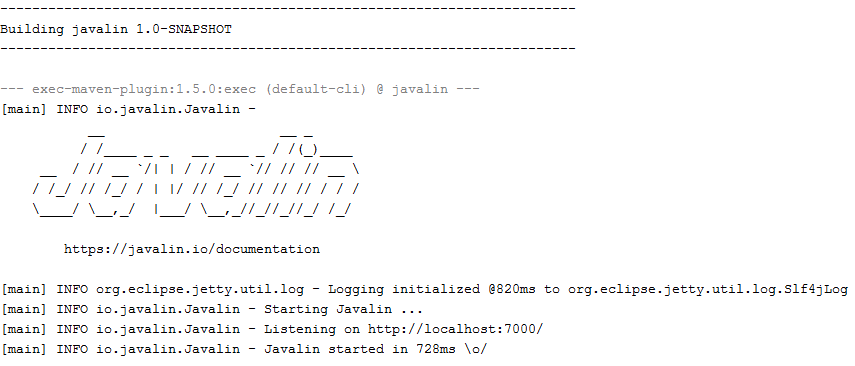
Se você acessar o http://localhost:7000/ vai ver a mensagem Hello World.
Manipuladores (Handlers)
Javalin tem três tipos de manipuladores: before-handlers, endpoint-handlers e after-handlers. (Há tembém o exception-handlers e error-handlers, iremos vê-los depois). O before-, endpoint- e o after-handlers são formados por três partes:
Um verbo: exemplo, before, get, post, put, delete, after
Um destino: exemplo, /, /hello-world
Uma implementação de manipulador: ctx -> {…}
A interface Handler tem o retorno do tipo void. Você utiliza ctx.result() para configurar a resposta que retornará para o usuário.
Before Handlers
Before-handlers são utilizados antes de qualquer request (incluindo arquivos estáticos, se você habilitar isto).
- Java
- Kotlin
app.before(ctx -> {
    // runs before all requests
});
app.before("/path/*", ctx -> {
    // runs before request to /path/*
});
app.before { ctx ->
    // runs before all requests
}
app.before("/path/*") { ctx ->
    // runs before request to /path/*
}
Endpoint Handlers
Endpoint-handlers são utilizados na ordem que foram definidos.
- Java
- Kotlin
app.get("/", ctx -> {
    // some code
    ctx.json(object);
});

app.post("/", ctx -> {
    // some code
    ctx.status(201);
});
app.get("/") { ctx ->
    // some code
    ctx.json(object)
}

app.post("/") { ctx ->
    // some code
    ctx.status(201)
}
Destinos do Handler podem incluir parâmetros. Eles são passados via ctx.pathParam(“key”):
- Java
- Kotlin
app.get("/hello/:name", ctx -> {
    ctx.result("Hello: " + ctx.pathParam("name"));
});
app.get("/hello/:name") { ctx ->
    ctx.result("Hello: " + ctx.pathParam("name"))
}
Destinos do Handler aceitam como parâmetros wildcard, que são chamados de path-parameters:
- Java
- Kotlin
app.get("/hello/*, ctx -> {
    // capture all request to sub-paths of /hello/
});
app.get("/hello/*") { ctx ->
    // capture all request to sub-paths of /hello/
}
After Handlers
After-handlers executam depois de cada request (mesmo que ocorra uma exceção)
- Java
- Kotlin
app.after(ctx -> {
    // run after all requests
});
app.after("/path/*", ctx -> {
    // runs after request to /path/*
});
app.after { ctx ->
    // run after all requests
}
app.after("/path/*") { ctx ->
    // runs after request to /path/*
}
Contex
O objeto Context fornece tudo que você precisa para a manipulação de um http-request. Ele contém o servlet-request e o servlet-response, e um grupo de getters e setters. Os getters operam na maioria das vezes no request-object, enquanto os setters operam exclusivamente no response object.
ctx.appAttribute(class)                 // get an attribute set on the app
ctx.register(class, object)             // register an extension on the context
ctx.use(class)                          // use an extension on the context
ctx.cookieStore(key)                    // get cookie store value
ctx.cookieStore(key, value)             // set a cookie store value
ctx.clearCookieStore()                  // clear the cookie store
ctx.matchedPath()                       // path that was used to match request (also includes before/after paths)
ctx.endpointHandlerPath()               // endpoint path that was used to match request (null in before, available in after)

// Request methods
ctx.body()                              // get body as string
ctx.bodyAsBytes()                       // get body as bytes
ctx.bodyAsClass(class)                  // get body as class
ctx.bodyValidator(class)                // get typed validator for body
ctx.uploadedFile(name)                  // get uploaded file by name
ctx.uploadedFiles(name)                 // get uploaded file(s) by name
ctx.formParam(key)                      // get form parameter
ctx.formParam(key, default)             // get form parameter (or default value)
ctx.formParam(key, class)               // get form parameter as class
ctx.formParam(key, class, default)      // get form parameter (or default value) as class
ctx.formParams(key)                     // get form parameters (multiple)
ctx.formParamMap()                      // get form parameter map
ctx.pathParam(key)                      // get path parameter
ctx.pathParam(key, class)               // get path as class
ctx.pathParamMap()                      // get path parameter map
ctx.basicAuthCredentials()              // get basic auth credentials (username/pwd)
ctx.attribute(key)                      // get request attribute
ctx.attributeMap()                      // get request attribute map
ctx.contentLength()                     // get request content length
ctx.contentType()                       // get request content type
ctx.cookie(name)                        // get request cookie
ctx.cookieMap()                         // get request cookie map
ctx.header(header)                      // get request header
ctx.headerMap()                         // get request header map
ctx.host()                              // get request host
ctx.ip()                                // get request host
ctx.isMultipart()                       // check if request is multipart
ctx.isMultipartFormData()               // check if request is multipart/form data
ctx.method()                            // get request method
ctx.path()                              // get request path
ctx.port()                              // get request port
ctx.protocol()                          // get request protocol
ctx.queryParam(key)                     // get query parameter
ctx.queryParam(key, default)            // get query parameter (or default value)
ctx.queryParam(key, class)              // get query parameter as class
ctx.queryParam(key, class, default)     // get query parameter (or default value) as class
ctx.queryParams(key)                    // get query parameters (multiple)
ctx.queryParamMap()                     // get query parameter map
ctx.queryString()                       // get query string
ctx.scheme()                            // get request scheme
ctx.sessionAttribute(key, value)        // set session attribute (server side attribute)
ctx.sessionAttribute(key)               // get session attribute
ctx.sessionAttributeMap()               // get attribute map
ctx.url()                               // get request url
ctx.fullUrl()                           // get request url + query param
ctx.contextPath()                       // get request context path
ctx.userAgent()                         // get request user agent

// Response methods
ctx.result(resultString)                // set a string result that will be sent to the client
ctx.resultString()                      // get the string result that will be sent to the client
ctx.result(resultStream)                // set a stream result that will be sent to the client
ctx.resultStream()                      // get the stream that will be sent to the client
ctx.result(future)                      // set a future result that will be sent to the client (async)
ctx.resultFuture()                      // get the future result that will be sent to the client
ctx.contentType(contentType)            // set the response content type
ctx.header(name, value)                 // set a response header
ctx.redirect(location)                  // send a redirect response to location
ctx.redirect(location, httpStatusCode)  // send a redirect response to location with status code
ctx.status(statusCode)                  // set response status
ctx.status()                            // get response status
ctx.cookie(name, value)                 // set cookie by name and value
ctx.cookie(cookie)                      // set cookie
ctx.removeCookie(name, path)            // remove a cookie
ctx.html(html)                          // call result(string).contentType("text/html")
ctx.json(obj)                           // call result(JavalinJson.toJson(obj)).contentType("application/json")
ctx.json(future)                        // call result(future(JavalinJson.toJson(obj))).contentType("application/json")
ctx.render(filePath, model)             // call html(JavalinRenderer.render(filePath, model)
https://javalin.io/documentation
❤️ Curso Java Para Iniciantes
👍 Curso de Desenvolvimento Web Completo
#java #javalin



Deixe um comentário